Showing posts with label GoLang. Show all posts

Friday, January 27, 2017

To shadow or to not?

Long story short: it's easy to accidentally shadow a variable by using := operator in if statement. Be aware:

package main

import (
 "fmt"
)

func f() (int, int) { return 2, 2 }

func main() {
 var x = 1
 if x, y := f(); x == y {
  fmt.Printf("%d %d\n", x, y)
 }
 fmt.Printf("%d\n", x)
 x, y := f()
 fmt.Printf("%d %d\n", x, y)
}
The output is:

2 2
1
2 2
Run in Golang Play: https://play.golang.org/p/lymn2gl6Wi.

Thursday, April 7, 2016

Go: imagick image croping after rotation problem

I need to load image rotate it by some angle, then crop some part of it. Seems trivial, isn't?

I use: gopkg.in/gographics/imagick.v2/imagick package.

Load image
iwand := imagick.NewMagickWand()
defer iwand.Destroy()
if err := iwand.ReadImage(s); err != nil {
 log.Panicf("cannot open image %s", err)
}
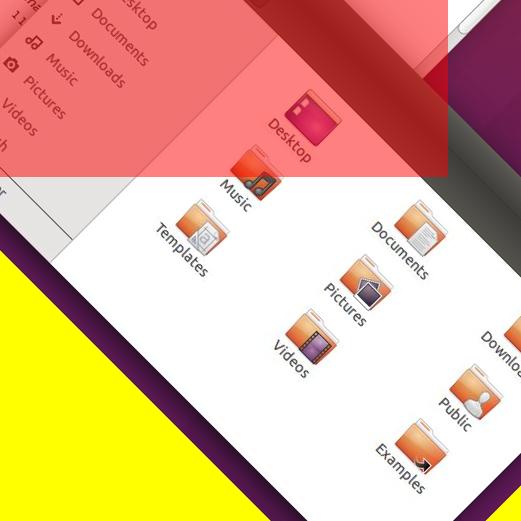
Rotate it, fill new area with yellow
w := iwand.GetImageWidth()
h := iwand.GetImageHeight()
log.Printf("old size: %d,%d", w, h)
pwand := imagick.NewPixelWand()
pwand.SetColor("yellow")
if err := iwand.RotateImage(pwand, 45); err != nil {
 log.Panicf("problem with rotation: %s", err)
}
Calculate the position and size of the rectangle to cut
newW := calcSize(w, h)
newH := newW

w = iwand.GetImageWidth()
h = iwand.GetImageHeight()
log.Printf("new size: %d,%d", w, h)

x := int((w - newW) / 2)
y := int((h - newH) / 2)
Make the area red (with transparency), just for learning
dwand := imagick.NewDrawingWand()
pwand.SetColor("red")
pwand.SetOpacity(0.5)
dwand.SetFillColor(pwand)
dwand.Rectangle(float64(x), float64(y), float64(newW+uint(x)), float64(newH+uint(y)))
iwand.DrawImage(dwand)
Crop and save to file
log.Printf("w,h,x,y: %d,%d,%d,%d", newW, newH, x, y)
if err := iwand.CropImage(newW, newH, x, y); err != nil {
 log.Fatalf("problem with crop: %s", err)
}
iwand.WriteImage(d)

Input file
Original image (from: https://en.wikipedia.org/wiki/Linux)

Output file
Image rotated and cropped

Need to repage!
log.Printf("w,h,x,y: %d,%d,%d,%d", newW, newH, x, y)
iwand.ResetImagePage("")
if err := iwand.CropImage(newW, newH, x, y); err != nil {
 log.Fatalf("problem with crop: %s", err)
}
iwand.WriteImage(d)
Rotated and cropped - fixed
Full source: gist

Monday, February 8, 2016

No, because no

I need Math.Round from Go's standard library, poor me:


I know it's hard. But hey, most languages provide it.

Rob Pike:
Floating point numbers don't have digits.
The bar for being useful needs to be pretty high to be in the Go math package. We accepted most of what's in the C library but we're not going to take all the routines from other libraries. The Javascript round is a 1-liner: int(f+0.5). 

Thursday, October 8, 2015

Save yourself and pass the context by

One of extending packages of Go is golang.org/x/net/context package. The idea comes form task oriented programming. You get a task to execute but want to attach some data to it. It appears to be useful when programing a RPC or web server solutions. In such cases your listener creates a context object and pass it to handlers. The handlers keep it and use it when appropriate.

This idea guided most Google App Engine APIs for Go. Now they’ve introduced a Managed VM’s which are something between App Engine and Compute Engine. The refactored libraries can be found here: google.golang.org/appengine.

The standard way of logging in App Engine was to get a context and call methods:

func SomeHandler(w http.ResponseWriter, req *http.Request) {
    ctx := appengine.NewContext(req)    
    ctx.Infof("got request!")
}

Whereas the new way:

func SomeHandler(ctx context.Context, w http.ResponseWriter, req *http.Request) {
    log.Infof(ctx, "got request!")
}

The new way has one huge advantage, it allows you to pass any context which implements interface context.Context. It also requires to replace all appengine/log imports by a new package google.golang.org/appengine/log

The Go’ standard log library doesn’t have a concept of context at all.

Reasoning

I guess I should explain the advantage of using a context based log instead of standard one. In a case of task oriented application it allows the programmer to group all log messages related to given task. It’s a common practice to group messages by the place of the log function callback (the file and line where the log message is written). More sophisticated grouping includes process id and it may be a task id (or context in our case). Just imagine how much time it saves during debugging. It also allows much more sophisticated analysis of the server event flow without running in debugging mode.

I’ve created a tiny wrapper around both github.com/golang/glog library and google.golang.org/appengine/log: github.com/orian/utils/net/log. It should allow you to log both at App Engine and stand alone processes. Enjoy.

A real in depth explanation can be found in Go blog' article: Go Concurrency Patterns: Context

Tuesday, September 15, 2015

Slow compilation in Golang

Because I'm lazy and Go tends to not backport it's libraries, I've decided to migrate a project from go1.4 to go1.5. Everything would be great but the compilation process of the new version is noticeably slower than the old one.

Compile all your dependencies

What I've noticed some time ago is that if you change the version of Go the libs stay at old version. This causes them to be built on each go run you invoke. And if you use a library which automates rebuilding the binary on change like reflex () than you may wait long.

List all deps

To list all dependencies your application or library have you can invoke:
go list -f '{{.Deps}}' | tr "[" " " | tr "]" " " | xargs go list -f '{{if not .Standard}}{{.ImportPath}}{{end}}' > deps
(borrowed from from go-nuts)

Rebuild all packages

After that you can call:
go install -a $(tr -d '\n' < deps)

Update all packages

Alternative to the above, updates the code:
go install -u $(tr -d '\n' < deps)

Speedup

For my code it was from 15 seconds to below 1 second.

Apply to all subpackages in a project

As Craig Furman suggested in a comment (thanks):
go list -f '{{.Deps}}' ./... | tr "[" " " | tr "]" " " | \
  xargs go list -f '{{if not .Standard}}{{.ImportPath}}{{end}}' | \
  xargs go install -a

Thursday, July 30, 2015

Go: a list of structure field names

package main

import (
 "fmt"
 "reflect"
)

type User struct {
 Name     string
 Age      int
 Password string
}

func GetFieldNames(s interface{}) []string {
 t := reflect.TypeOf(s)
 if t.Kind() == reflect.Ptr {
  t = t.Elem()
 }
 if kind := t.Kind(); kind != reflect.Struct {
  fmt.Printf("not a struct kind: %s", kind)
  return nil
 }
 var ret []string
 for i := 0; i < t.NumField(); i++ {
  field := t.Field(i)
  ret = append(ret, field.Name)
 }
 return ret
}

func main() {
 u := User{}
 fmt.Println(GetFieldNames(u))
 fmt.Println(GetFieldNames(&u))
}
At Go Playground: http://play.golang.org/p/6LDoCIKFeH
The function returns a slice of strings. Each is a name of a field. If a pointer is an argument the underlying type's field names are returned. The function ended up in: github.com/orian/utils/reflect. A documentation is browsable at: https://gowalker.org/github.com/orian/utils/reflect.
A short explanation:
  • First get a reflect.Type of a given argument s
  • If s' kind is a pointer, get a descriptor of underlying type.
  • If underlying type is not a struct, return error..
  • Iterate over fields, add field names and return the result slice.

Wednesday, April 22, 2015

Reflex - trigger an execution of command on a file change event

How many times you were working on some tiny project that needs to be rebuild / restarted after you modify the code? I guess often.

After experimenting with some solutions I found an ultimate one: https://github.com/cespare/reflex
Installation:
go get github.com/cespare/reflex
Automatically recompiling markdown file into html every time the file is changed:
reflex -r '\.md$' blackfriday-tool -page article.md article.html
Or you can restart Go app when saved files:
reflex -r '\.go$' -- go run main.go

Sunday, November 16, 2014

Google: "GoLang compute md5 of file"

Title of this post is my last Google query.
It got me there: https://www.socketloop.com/tutorials/how-to-generate-checksum-for-file-in-go. After reading I was surprise that Go doesn't have ReaderWriter which reads data from some object implementing io.Reader and writes data to some other object implementing io.Writer. I've grabbed the code and started cleaning it but keeping all file content in memory made me search.
I went to GoLang official doc and found: func Copy(dst Writer, src Reader) (written int64, err error)
Copy copies from src to dst until either EOF is reached on src or an error occurs.
To summarize:

Below is the full source of main.go:
package main

import (
  "crypto/md5"
  "fmt"
  "io"
  "os"
)

func ComputeMd5(filePath string) ([]byte, error) {
  var result []byte
  file, err := os.Open(filePath)
  if err != nil {
    return result, err
  }
  defer file.Close()

  hash := md5.New()
  if _, err := io.Copy(hash, file); err != nil {
    return result, err
  }

  return hash.Sum(result), nil
}

func main() {
  if b, err := ComputeMd5("main.go"); err != nil {
    fmt.Printf("Err: %v", err)
  } else {
    fmt.Printf("main.go md5 checksum is: %x", b)
  }
}

$ go run main.go
main.go md5 checksum is: facd74ec8975d8fd84897fb352f8f87e

Tuesday, August 19, 2014

Google Drive API - searching

Part1

Search for an item by name

List files

Google Drive API is a REST API. One have a resources which can be created, changed or removed.
In Google Drive both files and directories are represented as a file. To look for a file with a specific name we have to use List method of a resource File.
Documentation: Files.List
When programming in Go, it's worth to look at implementation: Drive API in Go
One is interested in FilesService and search for a method List on it. The method returns FilesListCall which have methods allowing to set different query parameters.
Simple code getting all files:
func GetAllFiles(srv *drive.Service) ([]*drive.File, error) {
  return d.Files.List().Do()
}
According to the documentation, the List method by default returns all files on Drive limited by a maxResults parameter. One can change the limit by calling: d.Files.List().MaxResults(10). The default value is 100, and possible values are between 0 and 1000. If there are more files to list, the method returns a valid PageToken string in reponse which can be used in a following requests.
One can copy from documentation an example code in Go which handles PageToken:
// AllFiles fetches and displays all files
func AllFiles(d *drive.Service) ([]*drive.File, error) {
  var fs []*drive.File
  pageToken := ""
  for {
    q := d.Files.List()
    // If we have a pageToken set, apply it to the query
    if pageToken != "" {
      q = q.PageToken(pageToken)
    }
    r, err := q.Do()
    if err != nil {
      fmt.Printf("An error occurred: %v\n", err)
      return fs, err
    }
    fs = append(fs, r.Items...)
    pageToken = r.NextPageToken
    if pageToken == "" {
      break
    }
  }
  return fs, nil
}
Few words about results. The API returns []*drive.File. It's worth to take a look at a documentation: File and a code: type File struct in API source code.
The final code looks like: gist.github.com/orian/6a0d7883ca3678cb30ea

Search for a file with a specific name

Files don't have a name per se, the name shown in a drive.google.com is an attribute title of a resource File: File reference.
To search only files with a specific name we need to use q parameter. Go API allows to do that through Q(string) method. Example code below:
func FindFile(srv *drive.Service, name string) ([]*drive.File, error) {
  q := fmt.Sprintf("title = '%s'", name)
  return Files.List().Q(q).Do()
}

Search for a directory

The directory is a Google drive file with a special mimetype: 'application/vnd.google-apps.folder'. To search for a directory with a specific name we need to extend the previous code and a query parameter by "mimeType = 'application/vnd.google-apps.folder'".
func FindDir(srv *drive.Service, name string) ([]*drive.File, error) {
  q := fmt.Sprintf("mimeType = 'application/vnd.google-apps.folder' and title = '%s'", name)
  return Files.List().Q(q).Do()
}

Search for a directory knowing its parent id

If a name is not an identifier of file on Drive than what? FileId is an unique id given to each file on Google Drive. It's available as Id field of struct drive.File. If we look at search documentation: search parameters we can find parents property on which we can use operator in. E.g. when we have a folder id 1234 we can require a file to be in folder by writing '1234 in parents' as query.
func FindSubDir(srv *drive.Service, name, parentId string) ([]*drive.File, error) {
  subq := []string{
      "mimeType = 'application/vnd.google-apps.folder'", 
      fmt.Sprintf("title = '%s'", name),
      fmt.Sprintf("'%s' in parents", parentId),
  }
  q := strings.Join(subq, " and ")
  return Files.List().Q(q).Do()
}

Friday, August 15, 2014

Writing Google Drive upload application

This day has to come. I came back from holidays and have few thousands photos. Many of them to throw away but most of them to keep, share and print.
The photos were took by a standalone camera and backed up on a hard drive.
The tries of using Google Photos Backup for Mac OS, plus.google.com, drive.google.com were for me dissapointing. The first was stalled after few dozen of photos and no restart helped. The other ones also crashed and were rather slow.

After creating an app I was able to upload without significant problems over 2 thousand photos and counting.
The app works as follow:

  • Authorize
  • Find a directory on Google Drive, if not exist then create one.
  • Get a list of all files from a destination directory.
  • Scan a local directory to find files and for each:
    • check if a name matches a pattern
    • check if not already on Google Drive
    • upload

Authentication & authorization

Authentication identifies your application and informs Google that you are you. To create simple authentication and authorization code follow: Google Drive API - Quickstart for Go
This bootstrap our efforts so we have working program which authenticats and authorizes itself with a help of user.

Caution! The quickstart example (I guess some dependencies) requires Go version 1.3. It doesn't work with 1.2 and earlier (default version in Ubuntu 14.04 package repo as August 2014).

Authorization gives your app a credential to act as a specific Google user. Google is recommending using OAuth2.0. The data you want to access is covered by a scope. In a case of Google Drive and accessing/modifying content it's 'https://www.googleapis.com/auth/drive'.

This is already done by a quickstart app from the above tutorial. The only think we want to modify is to cache an access token so we don't have to ask user for Drive permission every time.

Caching the user's access token

The OAuth2 library we are using already have a support for saving a token. There is a interface Cache and a simple implementation CacheFile:
https://godoc.org/code.google.com/p/goauth2/oauth#Cache

First, we will separate code responsible for a creating token and transport.
func GetNewToken() (*oauth.Token, *oauth.Transport) {
 // Generate a URL to visit for authorization.
 authUrl := config.AuthCodeURL("state")
 log.Printf("Go to the following link in your browser: %v\n", authUrl)
 // Read the code, and exchange it for a token.
 log.Printf("Enter verification code: ")
 var code string
 fmt.Scanln(&code)

 t := &oauth.Transport{
  Config:    config,
  Transport: http.DefaultTransport,
 }
 token, err := t.Exchange(code)
 if err != nil {
  log.Fatalf("An error occurred exchanging the code: %v\n", err)
 }
 return token, t
}
The example which tries to load a token from file and if cannot then request a new one may looks as follow:
var cache oauth.Cache = oauth.CacheFile("access_token.json")
token, err := cache.Token()
var t *oauth.Transport
if err != nil {
 log.Printf("Need a new token. Cannot load old one.")
 token, t = GetNewToken()
 cache.PutToken(token)
} else {
 t = &oauth.Transport{
  Config:    config,
  Token:     token,
  Transport: http.DefaultTransport,
 }
}
Full source code: gist.github.com/orian/96b5140b66363f4dee65

Saturday, May 17, 2014

Using AppEngine remote_api in development environment

Note: This is a follow-up of a previous post Locally modifying Go package. As today (May 17, 2014) the changes described there are neccessary for a below code work.

We will modify: datastore_info.go provided as example of remote_api usage in App Engine Go SDK. One should follow the steps in Go SDK doc on remote_api to enable it.

Local client

The trivial function to sign in in a dev server as an admin is below.

func clientLocalLoginClient(host, email string) *http.Client {
 jar, err := cookiejar.New(nil)
 if err != nil {
  log.Fatalf("failed to make cookie jar: %v", err)
 }
 client := &http.Client{
  Jar: jar,
 }
 local_login_url := fmt.Sprintf("http://%s/_ah/login?email=%s&admin=True&action=Login&continue=", host, email)
 resp, err := client.Get(local_login_url)
 if err != nil {
  log.Fatalf("could not post login: %v", err)
 }
 defer resp.Body.Close()

 body, err := ioutil.ReadAll(resp.Body)
 if resp.StatusCode != http.StatusOK {
  log.Fatalf("unsuccessful request: status %d; body %q", resp.StatusCode, body)
 }
 if err != nil {
  log.Fatalf("unable to read response: %v", err)
 }

 m := regexp.MustCompile(`Logged in`).FindSubmatch(body)
 if m == nil {
  log.Fatalf("no auth code in response %q", body)
 }

 return client
}
Connecting to localhost instead a real app requires modifying a main to use the clientLocalLoginClient function if host address points to localhost:
 is_local := regexp.MustCompile(`.*(localhost|127\.0\.0\.1)`).MatchString(*host)
 if !is_local && *passwordFile == "" {
  log.Fatalf("Required flag: -password_file")
 }

 var client *http.Client
 if !is_local {
  p, err := ioutil.ReadFile(*passwordFile)
  if err != nil {
   log.Fatalf("Unable to read password from %q: %v", *passwordFile, err)
  }
  password := strings.TrimSpace(string(p))
  client = clientLoginClient(*host, *email, password)
 } else {
  client = clientLocalLoginClient(*host, *email)
 }

The full source code can be found here: https://gist.github.com/orian/3f74c6add4e4f572e108

The above code can be invoked as follow:

$ goapp run datastore_stats.go -host=localhost:8080 -email=test@example.com

Exporting data to sample app

Sample application with enabled remote_api in Go and data exporter can be found on GitHub github.com/orian/gae-go-remote-api-example. The prerequirement is a configured Google App Engine Go SDK.
Getting and starting the app:

cd workspace/go
git clone git@github.com:orian/gae-go-remote-api-example.git
cd gae-go-remote-api-example
goapp server
This starts app and logs 3 crucial info:
INFO     2014-05-17 21:30:27,120 api_server.py:171] Starting API server at: http://localhost:55542
INFO     2014-05-17 21:30:27,132 dispatcher.py:182] Starting module "default" running at: http://localhost:8080
INFO     2014-05-17 21:30:27,133 admin_server.py:117] Starting admin server at: http://localhost:8000
In another terminal one can:
cd workspace/go/gae-go-remote-api-example/examples
goapp run export_data.go --data_dir data/ -host localhost:8080 -email test@test.com
The terminal output should look similar to:
2014/05/17 23:47:07 appengine: not running under devappserver2; using some default configuration
2014/05/17 23:47:07 App ID "gae-go-boilerplate"
Skip: 
Visited: data/data_item_0.json
Visited: data/data_item_1.json
filepath.Walk() returned    # ironically this is good
This means that data from files data_item_0.json and data_item_1.json has been opened successfully and exported. One can check on admin panel of dev server: http://localhost:8000/datastore?kind=DataItem

Sunday, May 4, 2014

Locally modifying Go package

Long story - short:
I'm playing with Google App Engine - Go version. I've tried to use one of the provided libraries and found out it doesn't work as I've expected.
A appengine/remote_api Client doesn't allow to connect to localhost and custom port, only default :80. I found a place in code responsible for handling localhost connection: https://github.com/golang/appengine/blob/a5bf4a208e232b1d3d1c972da47afe05b2c5faa5/remote_api/client.go#L46
    url := url.URL{
        Scheme: "https",
        Host: host,
        Path: "/_ah/remote_api",
    }
    if host == "localhost" {  // here's the reason
        url.Scheme = "http"
    }
then open terminal, go to directory where main go_appengine package is unpacked
cd ~/Downloads/software/go_appengine
find . -name remote_api
vim ./goroot/src/pkg/appengine/remote_api
and replace the above line with:
    if regexp.MustCompile(`^localhost(:\d{1,5})?$`).MatchString(host) {
Check it here: http://play.golang.org/p/fMogPEfgc8
There's one more thing one has to do, install modified package so it's used:
goapp install ./goroot/src/pkg/appengine/remote_api/
After this, if one run's goapp run my_super_tool.go it will use modified code. Pull request to original project.

Wednesday, August 15, 2012

"datastore: invalid entity type"

The below error message is defined in datastore package of AppEngine.
ErrInvalidEntityType = errors.New("datastore: invalid entity type")
If by the accident one wrote:
data := Data{}
err := datastore.Get(c, key, data)

One will get above error message. The correct code looks as below:
data := Data{}
err := datastore.Get(c, key, &data)

The change is third passed parameter.

According to doc:
Get loads the entity stored for k into dst, which must be a struct pointer or implement PropertyLoadSaver.

Friday, August 10, 2012

Simple RegExp in Go

package main

import (
  "fmt"
  "regexp"
)

func main() {
  re := regexp.MustCompile("/page/(?P[\\d]+)/")
  b := []byte("/page/1/")
  x := re.Find(b)
  fmt.Printf("Found: `%s`\n", x)
  x1 := re.FindAll(b, 100)
  fmt.Printf("Found: `%s`\n", x1)
  fmt.Printf("Subexp num: `%d`\n", re.NumSubexp())
  x2 := re.FindAllSubmatch(b, 100)
  fmt.Printf("Found: `%s`\n", x2)
  fmt.Printf("Subexp names: %s", re.SubexpNames())
}

And output:
Found: `/page/1/`
Found: `[/page/1/]`
Subexp num: `1`
Found: `[[/page/1/ 1]]`
Subexp names: [ pagenr]
You can try it here: http://play.golang.org/p/SqUe4X7vuR